Build the boring portfolio. Retire on your terms.

Grow your skills. Trade them for a better salary. Save what you can without sacrificing your life. Max out tax-advantaged accounts (401k, ISA, pension). Put the rest into low-cost, globally diversified index ETFs.

Don't know how to do all of that? Fire Tools does the math for you, on your own device.

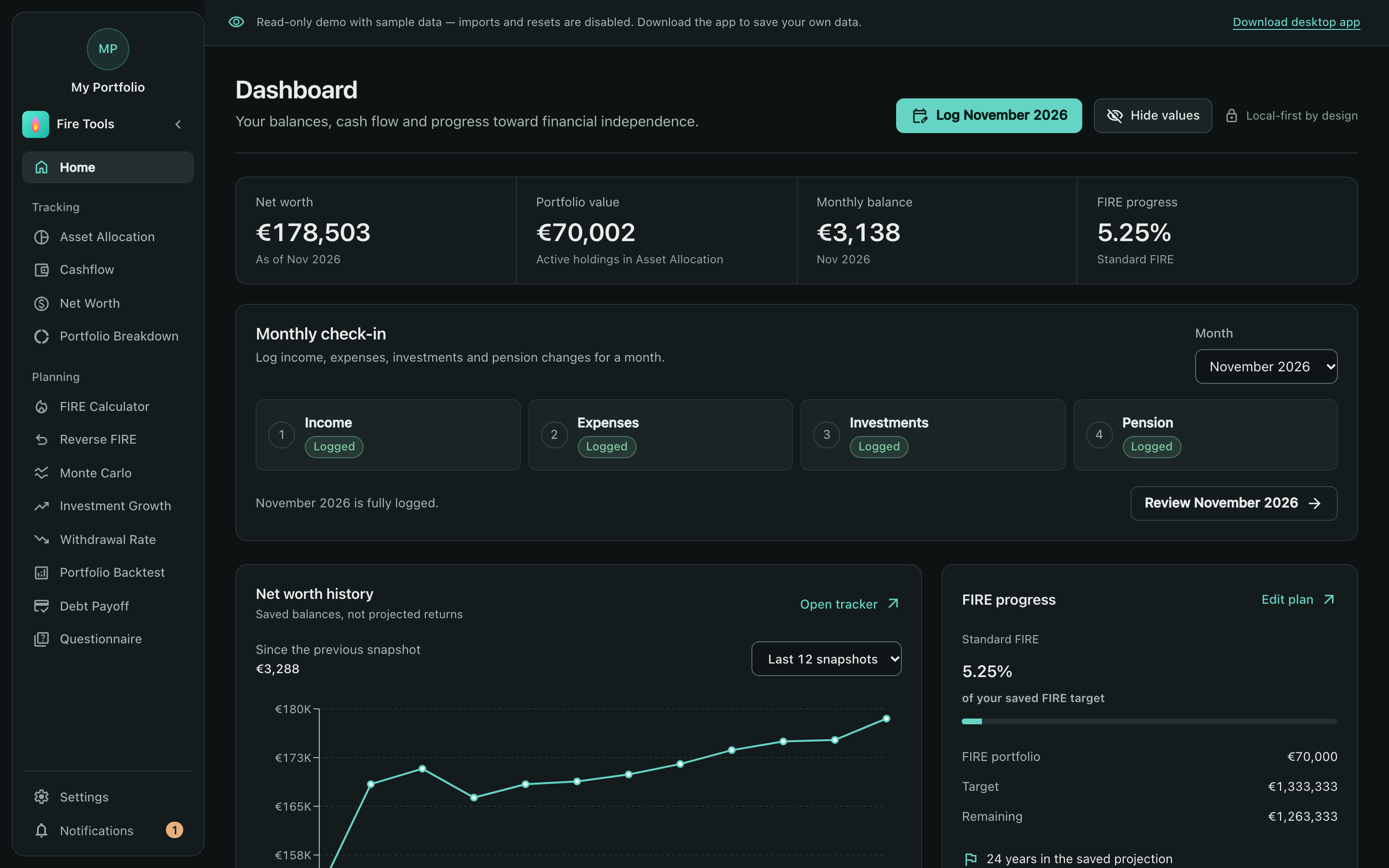
Fire Tools dashboard with net worth, portfolio value, monthly balance and FIRE progress, a net worth history chart and the monthly check-in.
Dashboard with the demo's sample data.

A guided monthly routine

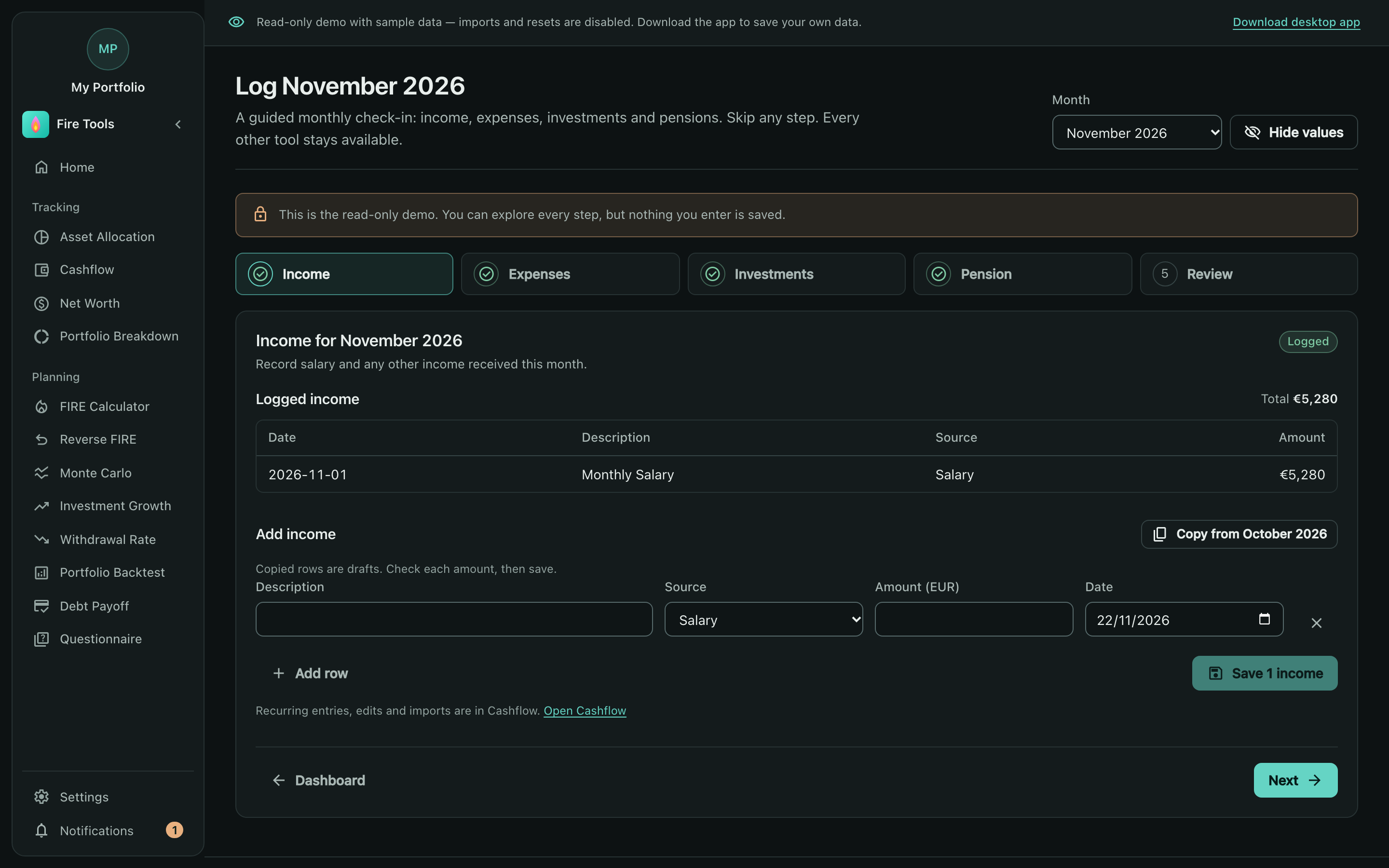
Log month walks you through the same four steps every month, then shows how the month moved your savings rate and net worth. Skip any step; every tool stays available on its own.

  1. IncomeSalary, freelance work and other income, with a copy from last month.
  2. ExpensesPaste the month's spending as plain text and review suggested categories.
  3. InvestmentsUpdate holdings and cash balances, starting from last month's snapshot.
  4. PensionRecord pension values and see the change since last month.
The Log month flow with steps for income, expenses, investments and pension.

Paste a month of expenses

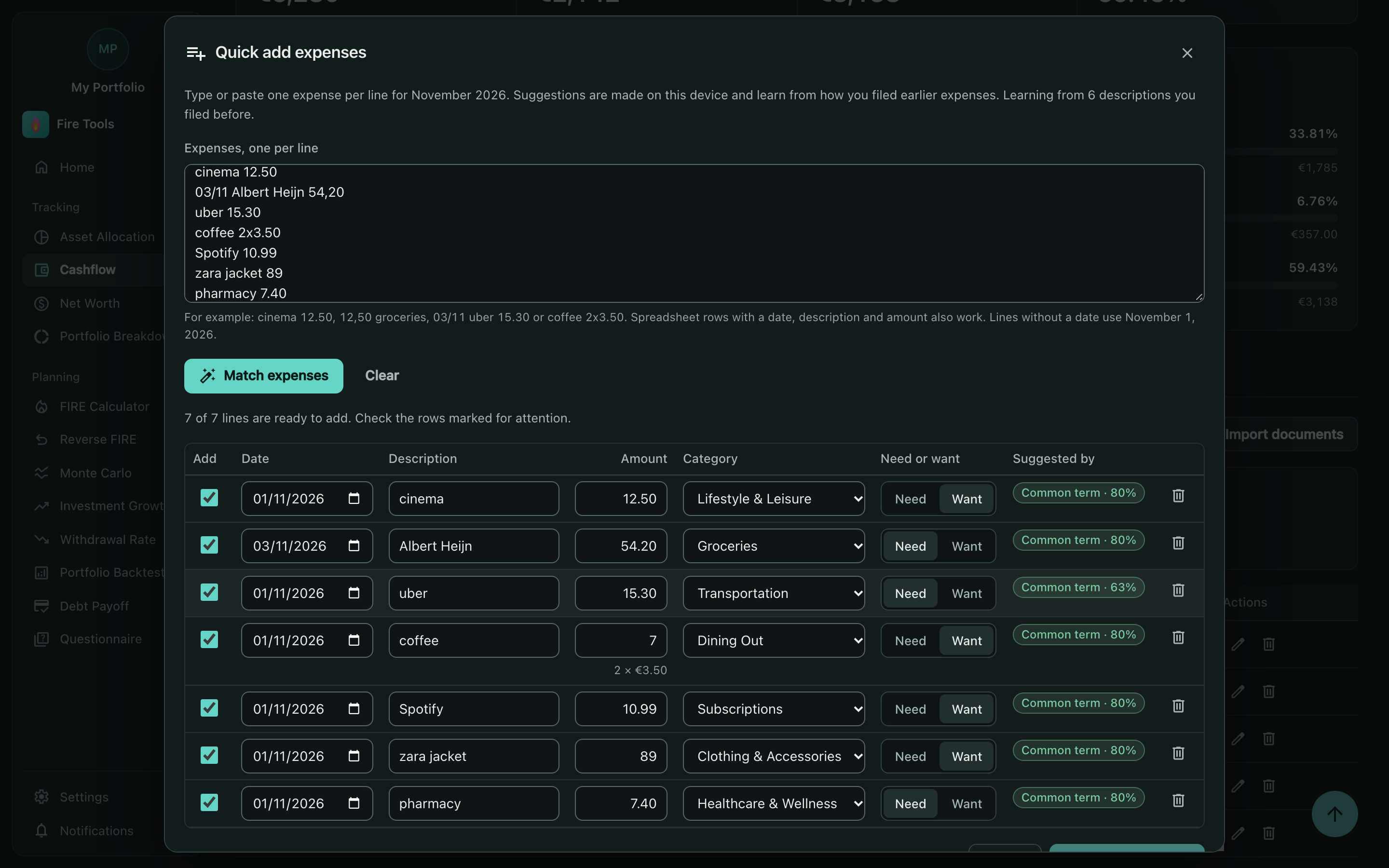
Write expenses the way you remember them, such as cinema 12.50 or 03/11 groceries 54,20. Fire Tools matches each line to a category with a BM25 search over your own history and a built-in multilingual vocabulary. It runs locally and learns how you file things.

  • Your import rules always win, then your own past expenses, then common terms.
  • Need or want stays your choice for every expense.
  • Optional AI refinement uses the provider you configure: a local model such as Ollama or LM Studio, OpenRouter, OpenAI, Gemini, Anthropic or any OpenAI-compatible endpoint. Only descriptions and amounts are sent, and only when you ask.
Quick add dialog with pasted expenses, suggested categories and confidence for each line.

Every tool in one workspace

The same tools as the app sidebar. Each link opens the read-only demo.

Tracking

Dashboard
Net worth, portfolio, monthly cash flow and FIRE progress at a glance, plus the monthly check-in.
Cashflow
Income, expenses, budgets and the 50/30/20 check. CSV, workbook and document imports, scheduled bills and savings goals.
Net worth
Monthly snapshots of holdings, cash, pensions, debts and taxes, with history and a wealth flow diagram.
Asset allocation
Targets per asset class, buy, sell or hold suggestions and a DCA helper for new contributions.
Portfolio breakdown Preview
Holdings by sector, region, currency and provider. Enable it in the desktop app's Settings.

Planning

FIRE calculator
Years to financial independence for Standard, Lean, Fat, Barista and Coast FIRE. Save scenarios or share them by URL.
Reverse FIRE
Pick a retirement age and work out the monthly savings needed to reach it.
Monte Carlo
Stress-test your plan with randomized returns, volatility and black-swan events.
Investment growth
Project growth from contributions, expected returns and inflation.
Withdrawal rate
Portfolio longevity at different withdrawal rates, grounded in the Trinity Study.
Portfolio backtest
Your allocation against historical returns: growth, drawdowns and yearly results.
Debt payoff
Snowball or avalanche, by budget or by timeline, with the total interest cost.
FIRE questionnaire
A FIRE approach suggested from your goals, finances and risk tolerance.

The browser demo uses sample data and does not save edits. Download the local-first desktop app for your own finances, or run its SQLite backend with Docker Compose.

Local-first by design

Get Fire Tools

Desktop

macOS, Windows and Linux. The full read/write app, offline-first, with your data on your device.

Download a release

Self-host

Run the SQLite backend and read-only web demo with Docker Compose, then connect the desktop app.

Deployment guide

Mobile

A Flutter app is tracked in #134 and will live in a separate repository.

macOS: if the app is blocked

Download the macOS DMG or ZIP from the official releases. Open the DMG or extract the ZIP, then move Fire Tools.app into Applications before opening it.

If macOS Gatekeeper blocks the app, first verify that your download came from the official releases above and that you trust it. Only then open Terminal and run:

xattr -dr com.apple.quarantine "/Applications/Fire Tools.app"

Reopen Fire Tools from Applications. This removes the quarantine attribute from this app only, bypassing its downloaded-app quarantine checks. Never use this command for an untrusted download or disable Gatekeeper globally.